I came across my old Command & Conquer: Generals CD while packing for a move. I put the boxes aside and went online to see whether people were still playing it.
I wanted to know if there had been a new release or an updated version. Mostly, though, finding that disc made me think of the little network café next to my grandma’s place in Lebanon, where I used to play.
Like a lot of kids in Sidon, I grew up playing in network cafés. We went there to play a skirmish, challenge our friends, or see what new game the owner had installed. That was how we discovered games: someone would start playing, and the rest of us would gather around their screen.
In the early 2000s, a computer was a big purchase for a family. Among the kids I knew, having a PC at home was unusual; having one that could run the latest games was rarer still. Asking our parents for a gaming PC was a very different conversation from asking for enough money to spend an hour at the network.
Lebanon was still rebuilding after the 1975–1990 civil war, which had devastated its economy and infrastructure. Technology was part of the reconstruction plans. In 1997, then-prime minister Rafik Hariri met IBM executives to discuss possible cooperation with the Lebanese public and private sectors. For us kids in Sidon, though, the place we could actually sit down at a computer and play was the neighborhood network.
Command & Conquer: Generals suited that setup. You picked an army, built a base, collected supplies, and spent them on units and upgrades while your opponent did the same. A skirmish let you play against the computer; a match over the café’s local network let you play against the person sitting a few seats away. You could watch someone’s strategy work, then try to beat it in the next game.
Zero Hour, the expansion, added specialist generals with different strengths, from air power to tanks and stealth. Choosing a general changed the units and tactics you had to work with. There was enough to learn that another match could feel worth another hour.
The café charged for time at the PC. At the network beside my grandma’s, an hour cost alef lira: 1,000 Lebanese lira. Ghazzawi, the owner, sometimes let me play for 500. That left me 250 for a Coke and another 250 for chips. That was my budget for an hour of Generals.
GHAZZAWI’S NETWORKMY 1,000 LIRA
PLAY TIME500 L.L.
COKE250 L.L.
CHIPS250 L.L.
TOTAL1,000 L.L.
THE OTHER HALF OF THE BUDGET
CHIPS250 L.L.
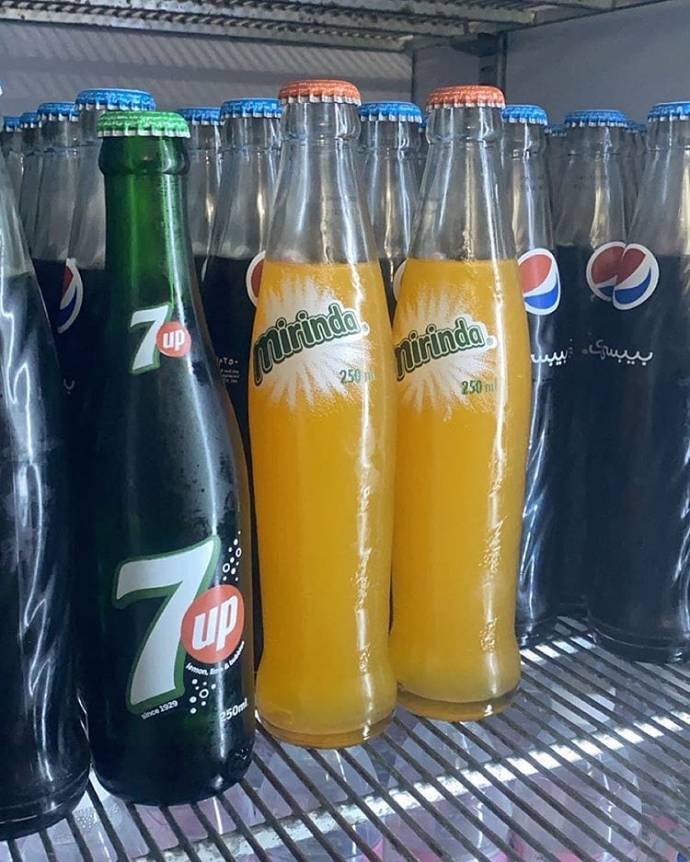
SOFT DRINKS250 L.L.
Photos: soft drinks and chips from Beirut.com. The drink photo shows Pepsi, 7UP and Mirinda; the Coke price above is from my memory.
THE BANKNOTE / LEBANON
One thousand lira.
The note I remember.Illustrated tribute to the Lebanese 1,000-lira note, not a historical reproduction.
BACK AT MY COMPUTER
The source code was there.
COMMAND & CONQUER: GENERALS / ZERO HOUR
LOOKING INSIDE GENERALSIndependent illustration
I found that EA had released the source code for Generals and Zero Hour. The announcement was from February 2025, and it led to EA’s own GitHub repository.
I’d spent so much time playing this game as a kid. Being able to open the files behind it made me want to do more than install it again. I wanted to see how it worked, then find out what I could change in my own copy.
I started with something practical: getting the game to run on my current setup. Then I could work on the things I would actually see and use while playing: the unit textures, aircraft, menu, and controls. I wanted it to feel familiar, with artwork and a setup that suited how I play now.
That became my weekend project. I used AI to help work through code, make artwork, and troubleshoot problems. I worked through one change at a time. Getting the game to launch was the first milestone; seeing the new artwork in place gave me a reason to keep going.
Where to find the code
Start with EA’s Generals / Zero Hour repository and read the README. The two game folders are linked below; open either one to browse the files directly on GitHub.
The release makes the code available to study and modify, but rebuilding the engine takes more setup. The README lists missing third-party dependencies and an old Visual C++ 6.0 build environment. You still need your own copy of the game to use the compiled binaries.
A LOOK AT THE C++
What the code actually does
The files become easier to follow when you start with a question about the game: when does a match advance, how does a camera setting get loaded, or why does one attack do more damage than another?
Here are four examples from EA’s Zero Hour source, with the original code linked beside each filename. These explain the existing engine; my own project changes are described in the next section.
These three lines sit inside GameEngine::update(). They update the audio and game client, then deliver queued messages. The -> operator calls a method on the object that a pointer refers to; here, each object represents a different engine system.
Farther down, a separate check decides whether the simulation can advance:
&& means “and,” || means “or,” and ! means “not.” With no network session, the game logic advances when the game is unpaused. With a network session, it waits until the required frame data is ready.
That connects directly to those café matches: the simulation has to account for the other players’ data. It also shows why updating sound or the client is separate from advancing the match itself.
This is an entry in a table that tells the INI reader how to load settings. The quoted name, MaxCameraHeight, is the setting to recognize. INI::parseReal reads its numerical value, including decimals.
The last part identifies where to store that number: offsetof gives the location of m_maxCameraHeight inside GlobalData. The text in the settings file and the C++ member have different names; this entry connects them.
For example: if the reader receives a value of 400.0 for this setting, this mapping tells it which field should receive that value. That number is only an illustration, not a recommended camera height.
This is a starting point for investigating camera behavior. It doesn’t implement WASD movement or show how the camera enforces its height limit. To trace that behavior, the next step is to search for uses of m_maxCameraHeight.
COMMAND & CONQUER / CHARACTER STUDY
Tanya, reimagined.
A Red Alert 3 tribute. AI-generated artwork, not gameplay.
This function takes the weapon template’s base primary damage and multiplies it by the damage factor in WeaponBonus. return sends the calculated value back to whatever called the function.
For example: a base value of 100 with a factor of 1.25 produces 125. A factor of 1.0 leaves it at 100. These are sample numbers to demonstrate the calculation, not statistics for a particular unit.
The function receives the bonus; it doesn’t decide which upgrade or effect supplied it. It also doesn’t say how much health the target ultimately loses. It calculates one value that the rest of the damage system can use.
For my artwork work, that distinction matters. A new texture can change how a tank looks while its weapon values stay the same. Changing this calculation would change combat balance.
Inside ArmorTemplate::adjustDamage(), t identifies the damage type. The brackets select that type’s armor coefficient. *= means “multiply the current value by this number and store the result.”
For example: 100 incoming damage multiplied by 0.5 becomes 50. With a coefficient of 1.5, it becomes 150. The next two lines prevent the result from going below zero.
Earlier in the same function, the two unresistable damage types return immediately and bypass this multiplication. The excerpt is the ordinary adjustment path, not the entire function.
This helps explain why damage type matters when comparing attacks. The same incoming amount can have a different result against different armor definitions. For a visual refresh, keeping those definitions unchanged helps preserve the matchups I remember.
For the infantry artwork, the useful starting point is a single soldier. Find its model, identify the texture wrapped around it, and make one visible change. Once that works in the game, there’s a clear path to improving the rest.
This is a practical workflow to follow with your own game files. A texture refresh changes the painted surface. Changing a helmet’s shape or adding equipment also involves the model, and sometimes the way that model attaches to its skeleton.
📂 Find the Ranger’s files
Open your game’s installation folder through your launcher’s file-browsing option. Look in the installed game archives, rather than expecting the source-code repository to contain a complete art library.
Jaymioz’s Ranger tutorial extracts models from W3D.big and the texture from Textures.big using FinalBIG. It uses the original Generals installation as the source of those shared assets. Check both games’ archives if a file is absent from Zero Hour, and extract into a separate working folder.
A Ranger file map, based on the tutorial’s extraction and model import steps
File or folder
What you use it for
Art/W3D/AIRNGR_SKN.W3D
The soldier’s mesh, including the geometry you see.
Art/W3D/AIRNGR_SKL.W3D
The skeleton that the animated soldier uses.
Art/W3D/ animation files
The associated movement and action clips. Keep the matching files together.
Art/Textures/zhca_airanger.tga
The Ranger texture named in the tutorial. Confirm the material reference in your own model before editing.
These are archive-relative paths, not a fixed Windows installation location. An installed mod may use different models or texture names.
🔎 Trace the model back to the unit
Extract the relevant INI files as well. In the working folder, search for the Ranger’s model name. This PowerShell command only reads extracted text files and reports matching lines:
PowerShell · run inside your extracted-files folder
Inspect each match in context. A model can appear in more than one unit definition or general’s variant. Follow the draw settings and the model’s material references to the texture it actually uses. A file with a familiar name is only a candidate until those references agree.
The connection is visible in EA’s drawing code. When a model state needs a render object, the engine passes the model name, scale, and color to the asset manager:
A replacement therefore needs to match the asset reference the engine requests, or the reference must be updated along with it. This call helps explain the lookup; it is not a texture-editing command.
🎨 Improve the uniform before rebuilding the soldier
Start with a copy of the existing texture. Keep its UV layout, the arrangement that tells the model which part of the image belongs on each surface. Moving the face, sleeves, or equipment into different parts of the image can put those details in the wrong place on the soldier.
Separate the materials. Give fabric, webbing, skin, and metal distinct colors and shading. The vest should remain readable against the uniform.
Choose detail that survives the camera distance. Clean helmet edges, straps, boots, and weapon shapes usually matter more than tiny stitching.
Keep the lighting consistent. Avoid painting strong highlights from different directions onto adjoining body parts.
Use AI output as a starting layer. Compare it with the original UV layout and repair seams, invented pockets, and misplaced facial details by hand.
My suggested first test is a small, obvious uniform-color change. If it appears on the correct soldier, restore the intended palette and begin the detailed work. That checks the asset path before you spend hours repainting it.
🧩 Change the silhouette when a texture isn’t enough
A painted pouch cannot change the outline of the soldier. For a different helmet, larger backpack, or revised weapon shape, inspect the mesh in a 3D editor. The OpenSAGE Blender plugin imports and exports W3D files; use the Blender versions and setup instructions listed by the project.
For a first mesh edit, keep the existing skeleton, bone names, and scale. Check that edited vertices remain assigned to the appropriate bones. Then preview the idle, running, and firing animations. A good-looking still model can still have a floating weapon or badly bending arms once it moves.
Use the original model beside the edited version as a reference. Changing geometry is a separate stage from repainting, so get the texture replacement working before introducing a new mesh.
📦 Export and package a small test
Keep a layered working image and export a game-ready texture separately. Preserve the required alpha channel and use a supported format. DDS compression choices handle alpha differently, so a higher-numbered format is not automatically an improvement. The community’s DDS guide explains those choices.
Retain the internal Art/Textures/ and Art/W3D/ paths in the mod package. Generals Mod Builder can build BIG archives from an organized set of edited files; its sample project shows how to configure a package. Build a separate mod rather than replacing the original game archives.
For textures with multiple states, inspect the whole set. The texture guidelines describe damage, snow, and night variations. Update the variants the asset actually uses, so it doesn’t unexpectedly switch back to the old artwork.
🎮 Judge it during a match
Build the unit in a skirmish and compare it with a screenshot of the original at the same camera distance. Check it standing, running, firing, injured, and dying. Try several team colors and backgrounds. Inspect the face and seams up close, then zoom out to see whether the soldier is still easy to recognize.
If nothing changes, revisit the loaded mod, internal path, and model reference. If the texture appears broken, inspect its material link, UVs, and alpha. If the body deforms, return to the skeleton and vertex weights. Test a group of units too, since a detailed replacement needs to hold up when there are many soldiers on screen.
The first useful result is one soldier that looks better and still behaves properly. That gives the rest of the infantry work a consistent standard to follow.
THE WEEKEND BUILD
What I worked on.
I started with the launch problems, then worked through the artwork and controls. This is where the project stands so far.
GENERALSZERO HOUR
WHAT CHANGEDA WORK IN PROGRESS
SETUP
Getting the game running
I fixed startup problems and issues with the Documents folder path, built dedicated launchers, and set up tools to extract, edit, preview, and package the game’s assets.
GROUND UNITS
Updating the USA artwork
I updated the artwork for USA infantry, ground vehicles, and buildings. The original models and gameplay are still underneath.
AIRCRAFT
Working through the aircraft
I refreshed the Raptors, Auroras, stealth aircraft, helicopters, and transports, including their damaged textures. Their flight behaviour stays the same.
INTERFACE
Changing the intro and menu
I made a cinematic intro and a coastal battlefield menu, adapted the interface for an ultrawide screen, and added seven custom ability icons.
CONTROLS
Adjusting it to how I play now
I added WASD camera controls that only apply while the game is active, along with a recovery shortcut. New skirmishes start with $1,000,000, and the game can run at 5120 × 1440 in borderless fullscreen.
STILL TO DO
More time in actual matches
The assets passed packaging checks, and I got the borderless game to launch at full resolution. I still need to play through it properly and test how the changes hold up during matches.
The hero and banknote artwork are illustrations, not gameplay screenshots or historical photographs.
WHERE I WANT TO TAKE IT
Something to keep working on.
There’s still work to do, but I want to keep going. I hope I can turn this into something Lebanese kids can play and enjoy. I’d love for them to get a little of the excitement I remember from the network next to my grandma’s.
For now, I’m happy to be playing around with Generals again. Finding that CD was a good excuse to come back to it.